DANQVORA
PICKS / DESK ACCESSORIES / 2026
DANQVORA PICKS · WORKSPACE BUYING GUIDE

10 Best Desk Accessories for Trading & Productivity in 2026

A research-led shortlist for sharper workflows, cleaner workstations and easier multitasking. These are specification-led editorial selections, not hands-on product tests or a numerical performance ranking.

Editorial note. Product selection is guided by documented features, use cases and trade-offs. Some outgoing purchase links may earn Danqvora a commission at no additional cost to readers. As an Amazon Associate I earn from qualifying purchases.

01 / FIRST PRINCIPLES

Buy to remove a bottleneck, not to fill the desk.

A good trading or research workstation starts with legible information, predictable connectivity, and a comfortable position—not an abundance of gadgets. A monitor arm may solve screen placement; a hub may solve connection friction; a keyboard shortcut controller may not help at all unless you have repetitive tasks worth automating.

This shortlist groups ten different types of accessories by the real problem each one addresses. It favors manufacturer documentation, compatibility caveats and practical downsides over unverified rankings, star scores or marketing superlatives.

Nothing here is an investment recommendation. Hardware cannot make an unprofitable trading strategy profitable. No product was physically tested by Danqvora for this guide.

02 / QUICK COMPARISON

Ten tools, ten different jobs.

ProductCategoryStrengthBest use
01 / Ergotron LX Desk Monitor ArmMonitor armFlexible positioningUsers who reposition a primary or secondary display frequently.
02 / Logitech MX Master 3SMouseMultitasking controlsRight-handed readers working across spreadsheets, research and several applications.
03 / Logitech MX Keys SKeyboardTyping and shortcutsPeople writing frequent notes, entering figures and moving among tools.
04 / BenQ ScreenBar HaloDesk lightingScreen-area lightReaders who work with printed notes or keyboards in mixed ambient lighting.
05 / Anker 555 USB-C Hub (8-in-1)ConnectivityLaptop expansionLaptop-based research desks with a single monitor and several wired accessories.
06 / Elgato Stream Deck NeoShortcut controllerRepetitive-task shortcutsAnalysts, creators and power users who repeat the same non-trading desktop actions.
07 / UGREEN Nexode 100W 4-Port GaN ChargerChargingConsolidated powerDesks charging several USB-C devices throughout a workday.
08 / Rain Design mStandLaptop standRaised laptop displayLaptop users who connect an external keyboard and mouse.
09 / Orbitkey Desk Mat ProDesk organizationPaper and cable controlWorkstations with note pads, cables and frequently handled paper documents.
10 / Kensington SmartFit SoleMate Foot RestErgonomicsFoot positioningDesks where the seating height leaves feet unsupported.

“Best use” is a qualitative editorial fit, not a measured score. Source documentation appears on each product card.

03 / THE TEN SELECTIONS

Build the workspace around what you actually do.

Where available, Amazon US and India links are marked as sponsored and accompanied by a nearby commission note. Missing links remain hidden until an exact regional listing is confirmed.

01
Flexible positioning · Monitor arm

Ergotron LX Desk Monitor Arm

For compatible displays up to 34 in · 3.2–11.3 kg

A movable arm can free desk space and make it easier to rotate a secondary chart display or shift a screen between sitting and standing positions.

BEST FORUsers who reposition a primary or secondary display frequently.
BEFORE YOU BUYCheck monitor weight without its stand, 75/100 mm VESA mounting and desk-clamp clearance; not every ultrawide is compatible.

Trade-off: Desk clamp and VESA fit must be verified; the arm does not replace a sturdy desk.

Danqvora may earn a commission through these Amazon purchase links.
02
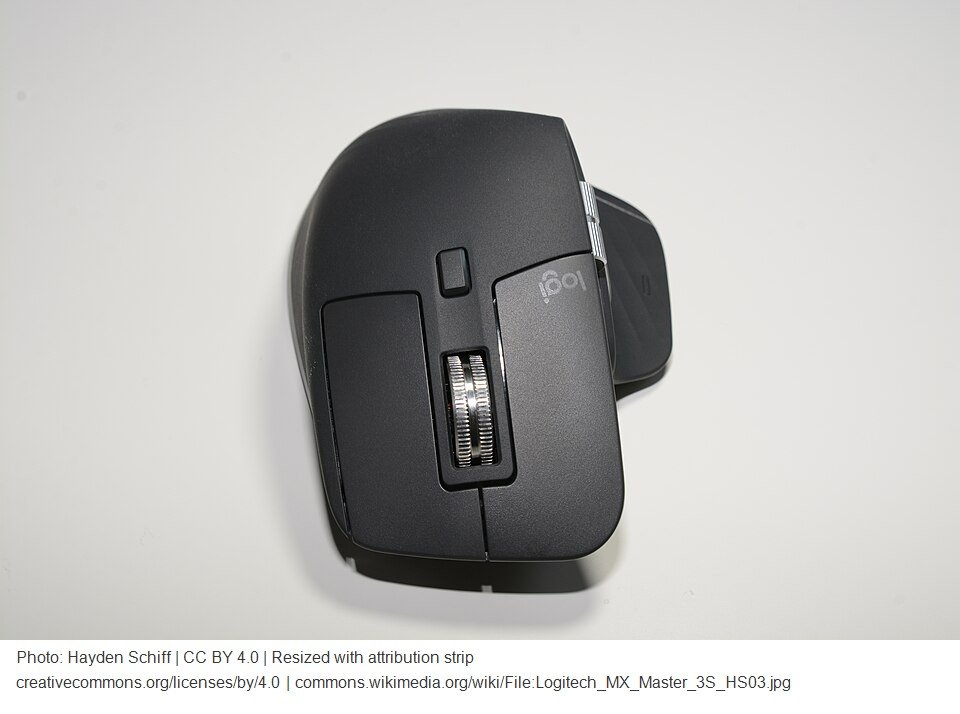
Logitech MX Master 3S — Danqvora-authorized product imageLogitech MX Master 3S
Multitasking controls · Mouse

Logitech MX Master 3S

8,000 DPI sensor · programmable controls · quiet clicks

A fast scrolling wheel and customizable buttons can help with long tables, spreadsheets, research tabs and complex desktop workflows.

BEST FORRight-handed readers working across spreadsheets, research and several applications.
BEFORE YOU BUYThe sculpted shape is right-hand oriented; check hand fit and software support before purchase.

Trade-off: Feature-rich controls come with a larger body and software setup.

Danqvora may earn a commission through these Amazon purchase links.

03
Typing and shortcuts · Keyboard

Logitech MX Keys S

Full-size wireless · backlit keys · customizable actions

The full-size layout is helpful for notes, numeric inputs and keyboard-driven research while smart illumination aids visibility in dimmer workspaces.

BEST FORPeople writing frequent notes, entering figures and moving among tools.
BEFORE YOU BUYA full-size board occupies desk width; ensure key layout and OS support fit your workflow.

Trade-off: It is not a compact keyboard; measure clearance alongside a large mouse pad.

Danqvora may earn a commission through these Amazon purchase links.

04
Screen-area light · Desk lighting

BenQ ScreenBar Halo

Dual-color LED · monitor-mounted · adjustable illumination

A monitor-mounted light can brighten notes and the keyboard without consuming valuable desk surface. The manufacturer lists thickness restrictions for flat and curved monitors.

BEST FORReaders who work with printed notes or keyboards in mixed ambient lighting.
BEFORE YOU BUYConfirm the clamp fits your monitor; lighting is not a substitute for breaks or proper screen brightness.

Trade-off: Specialized lighting costs more than a basic desk lamp and monitor compatibility is not universal.

Danqvora may earn a commission through these Amazon purchase links.

05
Laptop expansion · Connectivity

Anker 555 USB-C Hub (8-in-1)

HDMI 4K/60Hz · 1Gbps Ethernet · USB data up to 10Gbps

An external monitor, Ethernet, cards and peripherals can be connected via one compact laptop hub when compatible USB-C video output is available.

BEST FORLaptop-based research desks with a single monitor and several wired accessories.
BEFORE YOU BUYRequires compatible USB-C DisplayPort Alt Mode; 85W maximum power out and 4K/60Hz HDMI do not imply every laptop supports the same combination.

Trade-off: Not a full Thunderbolt dock; check display limits, charging and cable selection.

Danqvora may earn a commission through these Amazon purchase links.

06
Repetitive-task shortcuts · Shortcut controller

Elgato Stream Deck Neo

8 programmable LCD keys · two touch points · USB-C

One-touch shortcuts can open research tools, switch audio devices and trigger simple desktop workflows without filling the keyboard with memorized hotkeys.

BEST FORAnalysts, creators and power users who repeat the same non-trading desktop actions.
BEFORE YOU BUYMacros should not be used for unattended trading or actions requiring confirmation; check OS and application compatibility.

Trade-off: Requires initial customization and compatible apps to deliver value.

Danqvora may earn a commission through these Amazon purchase links.

07
Consolidated power · Charging

UGREEN Nexode 100W 4-Port GaN Charger

100W maximum shared · 3 USB-C + 1 USB-A ports

One four-port charger can reduce adapter clutter for a laptop, phone and smaller accessories when the total requested power fits the shared output budget.

BEST FORDesks charging several USB-C devices throughout a workday.
BEFORE YOU BUY100W is a maximum combined output, not 100W per port simultaneously. Verify regional plug type, safe cabling and device power needs.

Trade-off: Different countries use different models and plugs; select the exact SKU for your market.

Danqvora may earn a commission through these Amazon purchase links.

08
Raised laptop display · Laptop stand

Rain Design mStand

One-piece aluminum · raised platform · rear cable pass-through

A stable raised laptop can bring the screen closer to eye level while creating space underneath for a compact keyboard or dock.

BEST FORLaptop users who connect an external keyboard and mouse.
BEFORE YOU BUYFixed height and tilt may not suit every person; check laptop depth and use external peripherals for comfortable extended typing.

Trade-off: A fixed riser has less adjustment than an articulating stand.

Danqvora may earn a commission through these Amazon purchase links.

09
Paper and cable control · Desk organization

Orbitkey Desk Mat Pro

Document hideaway · cable holder · stationery toolbar

An integrated paper hideaway and cable holder give physical notes, chargers and frequently used stationery a defined place.

BEST FORWorkstations with note pads, cables and frequently handled paper documents.
BEFORE YOU BUYMeasure desk depth and your mouse-tracking space; the Pro mat differs from the simpler Orbitkey Desk Mat.

Trade-off: More organizer than basic mouse pad; may overlap other desk organizers.

Danqvora may earn a commission through these Amazon purchase links.

10
Foot positioning · Ergonomics

Kensington SmartFit SoleMate Foot Rest

Height and tilt adjustable · anti-slip base

A footrest may help users whose feet do not rest comfortably on the floor after chair and desk height are set for the arms and screen.

BEST FORDesks where the seating height leaves feet unsupported.
BEFORE YOU BUYChoose correct SKU and local availability; accessories do not replace an appropriately adjusted chair and desk.

Trade-off: Not needed if feet naturally rest comfortably with proper desk and chair height.

Danqvora may earn a commission through these Amazon purchase links.

04 / BUYING FRAMEWORK

Four questions before spending.

01 · What slows you down?

Identify a repeated problem such as repositioning a display, port scarcity, awkward typing, limited lighting or cable clutter. Buy for that problem first.

02 · Does it physically fit?

Measure desk depth, monitor arm clamp room, keyboard width, laptop stand dimensions and power socket placement. Product categories do not guarantee compatibility.

03 · Will your devices support it?

USB-C video, PD charging and monitor power delivery are separate capabilities. Verify your laptop's ports, OS and applications against the manufacturer's specifications.

04 · Is there a simpler alternative?

Built-in keyboard shortcuts, an ordinary desk lamp, cable clips or a second basic display may solve the same problem for less complexity.

05 / PRACTICAL FAQ

Before turning a desk into a cockpit.

Which three accessories should a new trader consider first?

Start with the actual workspace problem. A comfortable pointing device, suitable keyboard and a well-positioned monitor may be more useful than advanced macros or expensive desk décor. Don't buy something simply because it appears in this guide.

Do I need a Stream Deck for trading?

No. A programmable controller can help with navigation and non-trading desktop actions, but it is not necessary for market analysis. Never use an unreviewed macro for trades, risk limits or live orders.

Will any USB-C hub connect to two 4K monitors?

No. Check the laptop's Alt Mode or Thunderbolt support and the hub's specific display outputs. The Anker 555 cited here provides one HDMI connection rated up to 4K at 60Hz under supported conditions.

Why are no prices or ratings shown?

Store prices and availability change by country and seller. Danqvora has not collected repeatable hands-on measurements or its own verified customer-rating dataset for these accessories.

06 / TRANSPARENCY

How Danqvora selected these products.

Selection categories reflect distinct workstation needs: screen placement, input control, lighting, connectivity, automation, charging, laptop elevation, surface organization and foot positioning. Documented features and compatibility limitations were reviewed on the manufacturers' pages linked beside each product. These are editorial examples, not proof that every model is currently stocked in the United States or India.

Danqvora did not run laboratory tests, purchase these items or calculate first-hand scores. In future revisions we may replace a model if verified alternatives offer stronger value for the same task. We do not reproduce Amazon prices or claim product photographs are licensed without permission.

For monitors, read our six-monitor comparison; for market context, visit Danqvora Brief. Read the editorial and affiliate policy.